

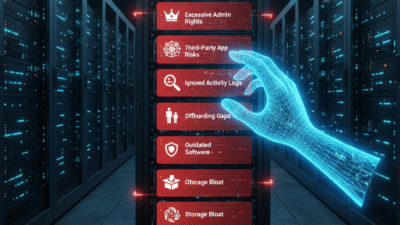
Managing a digital workspace can feel very difficult because one small error in your settings can lead to massive security risks. However, once you learn how to audit your admin console properly, you will see a much more secure and efficient operation. I have used these tips to help brands protect their data while seeing a boost in employee productivity.
The Problem With Poor Admin Management
Many business owners overlook their admin console because it seems like a purely technical task. This approach creates a massive gap in your security perimeter. You might feel safe but a single open port or an unmanaged device can bring your whole system down. Poor management is like leaving your front door wide open and hoping for the best.
The solution lies in taking total control over your digital infrastructure today. AI can now scan your settings to find vulnerabilities in just a few seconds. Once you fix these errors you will see your risk levels drop immediately. I have seen companies avoid total data loss by simply tightening their admin permissions.

Mistake 1: Ignoring Multi Factor Authentication
MFA is your first line of defense against unauthorized access to your company data. However, many admins leave this setting optional for their users. This creates a weak link that hackers can easily exploit to steal credentials. Therefore you must enforce MFA for every single account in your organization.
Mistake 2: Granting Excessive Super Admin Rights
Giving too many people full access to your console is a very dangerous habit. For instance, if a super admin account is compromised the attacker gets total control. You should only have two or three people with this level of power. Consequently, you reduce the surface area for a potential security breach.
Mistake 3: Failing to Audit Third Party Apps
Third party apps often request access to your core business data to function. Many admins approve these requests without checking the security of the app provider. Because of this, your sensitive information could be leaking to unknown servers. You should regularly review and revoke access for any apps that are not essential.
Mistake 4: Poor Device Management Policies
Your employees likely use multiple devices to access their work accounts every day. If these devices are not managed, you cannot wipe them if they are lost or stolen. AI can help you track these endpoints and enforce security standards automatically. This ensures that your business data stays within your control at all times.
Mistake 5: Neglecting Regular Admin Activity Logs
The admin logs tell you exactly who changed what in your system and when. However, many managers never look at these records until a problem occurs. Regular reviews allow you to spot suspicious behavior before it turns into a disaster. Therefore, you should schedule a weekly audit of your console activity.
Mistake 6: Leaving Onboarding and Offboarding Gaps
When an employee leaves your company, you must revoke their access immediately. A common error is leaving old accounts active for weeks after a person departs. This creates a massive security hole that can be used for data theft. Use automated tools to ensure that offboarding happens the moment a contract ends.
Mistake 7: Misconfiguring Data Sharing Permissions
Default settings in many consoles allow users to share files with anyone on the internet. While this is convenient, it often leads to accidental data leaks of sensitive records. You should set your sharing policies to “restricted” by default. In addition, you can use labels to identify which files require extra protection.
Mistake 8: Forgetting to Update Software and Apps
Outdated software is a primary target for malware and ransomware attacks. Many admins wait too long to push updates to their users across the network. AI can help you automate these updates so that your systems stay current without any manual work. This simple step is one of the best ways to keep your business safe.
Mistake 9: Inconsistent Storage Management
Digital storage costs can spiral out of control if you do not monitor your usage. Often, admins let old and useless files sit in the cloud for many years. This clutters your system and increases your monthly bills significantly. You should implement a clear data retention policy to delete what you no longer need.
Mistake 10: Lack of Admin Password Rotation
Admin passwords should be changed regularly to prevent long term account hijacking. However, many people use the same password for months or even years. This is a very risky practice that lowers your overall security score. Therefore, you should enforce a policy that requires password updates every ninety days.
Conclusion and Next Steps
If you follow the tips in this guide, you should soon see better security results for your business. Please do not forget to let me know how you got on in the comments below. I am always interested in hearing your thoughts, so tell me which tip you felt worked best for you.
FAQs
1 Why is MFA so important for admins?
It provides a second layer of security that prevents hackers from entering even if they have your password.
2 How many super admins should a company have?
Most experts recommend having at least two but no more than three for a medium sized business.
3 Can AI help manage my admin settings?
Yes, many modern consoles use AI to suggest security improvements and find data leaks automatically.
4 What happens if I forget to offboard a user?
The former employee may still have access to your private files which is a major security risk.
5 How often should I audit my admin logs?
You should perform a brief review of your logs at least once every week to catch suspicious activity early.
Also Read: How to manage multiple Gmail accounts efficiently