Refresh loader

Category : Agile Methodology

Home > Archive for Agile Methodology

How Do You Modernize Fleet Tracking with a vCTO? Ultimate Guide

Virtual CTO for Logistics MSMEs: Modernizing Legacy Fleet Tracking Systems Without Disrupting Drivers

Many small logistics firms still run on old fleet tracking tools. The screens look dated. Reports arrive late. Drivers call the office to share simple updates. Owners know the system is slow, but they fear change. A virtual CTO for logistics MSMEs can help fix this without chaos on the road.

MSME stands for micro, small, and medium enterprises. These firms move goods across cities and states. They run on thin margins and tight schedules. One bad rollout can delay deliveries and upset clients. This guide shows a safer way to modernize, with drivers at the center.

Why Legacy Fleet Tracking Systems Hold Logistics MSMEs Back

Legacy fleet tracking means older GPS devices and outdated software. Some systems update vehicle location only every few minutes. Others run on servers that few people can fix. Many do not connect with billing, e-way bills, or customer apps. Data sits in silos, and teams rely on phone calls.

Many old systems were installed years ago. Devices were fitted by vendors who no longer offer support. Manuals are lost, and passwords are forgotten. Data is stored on a single office computer. As a result, one power cut can erase months of records. Owners depend on one person who knows how everything works.

These gaps carry real costs. Dispatchers cannot see true vehicle status. Customers ask for updates that staff cannot give quickly. Fuel waste and idle time go unnoticed. As a result, owners lose money in small leaks that add up each month.

Security is another concern. Old software often lacks updates and strong login rules. Vendor support may end without warning. A failure could leave you blind to your whole fleet. Therefore, waiting is also a risk.

Compliance adds pressure. Clients now ask for delivery proof, live tracking links, and clean records. E-way bill checks and audits go faster when data is digital. Firms with old systems are left behind in tenders.

Still, many owners hesitate. They worry about cost, downtime, and driver anger. Those fears are valid. Yet a careful plan can address each one. That is where a virtual CTO adds value.

What Does a Virtual CTO Do for Logistics MSMEs and Tracking?

A virtual CTO is an experienced technology leader who works part-time or on demand. You may hear the term fractional CTO too. This person sets your technology plan, picks vendors, and guides your team. You get senior advice without a full-time salary. That suits small firms that cannot afford a full-time chief technology officer.

Here is what a virtual CTO usually covers. First, they audit your current systems, devices, and data. Next, they map your needs, such as live tracking, route planning, and driver safety. They compare vendors and negotiate terms. They manage the rollout and train your people.

A virtual CTO protects you from costly mistakes. They read contracts and check data ownership. They test security and backup plans. Moreover, they keep the project tied to business goals such as on-time delivery and lower fuel cost. Technology stays a tool, not a distraction.

Trust matters as much as skill. A good virtual CTO is chosen for logistics knowledge, not just technical skill. References should be checked and past projects reviewed. Fees are agreed in advance, with a clear scope. Regular review calls are scheduled with the owner.

How to Modernize Fleet Tracking Without Disrupting Drivers

Drivers decide whether a new system works. If the app is hard to use, they will skip it. If they feel watched, they will resist. Good modernization respects their time and trust. These steps help you get it right.

Step 1: Audit and Listen First

First, begin with a full audit of devices, software, and data flows. Talk to drivers, dispatchers, and customers. Ask what slows them down today. Ask what they fear about change. Their answers shape the design of the new system.

Step 2: Set Clear Goals

Next, pick a few goals you can measure. For example, fewer late deliveries, less idle time, and faster proof of delivery are good goals. Avoid a long wish list. Clear goals keep the project focused. They help you show wins later.

Step 3: Choose Simple, Driver-Friendly Tools

Look for apps with large buttons, local language support, and low data use. Test them on basic phones and weak networks. Choose tools that work offline and sync later. In contrast, avoid heavy apps that drain battery. Simple tools win drivers over quickly.

Hardware needs a plan too. Old devices can be reused if they meet the needs of the new software. New devices are installed during normal vehicle service to avoid extra downtime. Wiring is checked by a trained technician. Spare units are kept at each depot.

Step 4: Run a Small Pilot

Test the new system with a handful of trusted drivers and vehicles. Run it side by side with the old system for a few weeks. Compare data for accuracy. Collect feedback every week. Fix problems before you go wider.

Choose pilot routes that are typical, not easy. Include one long haul and one city route. Weak mobile network zones should be tested too.

Step 5: Explain the Why and Train in Short Sessions

Additionally, tell drivers how the system helps them. It can prove on-time arrival, protect them from false claims, and speed up payments. Share how you will use location data and what you will not use it for. Moreover, keep training short and hands-on. Pair new drivers with a peer champion.

Driver concerns are real and should be heard. Location tracking may feel like spying to some crews. Rules for data use should be written in simple words. Personal trips and rest breaks must be respected. Trust is earned when promises are kept.

Step 6: Roll Out in Phases

Move route by route or depot by depot. Keep the old system as a backup until the new one proves stable. Track issues in a simple log. Celebrate small wins with your team. Finally, retire the old system only after a clean handover.

Support must be ready during the first week. A helpline is staffed by trained people, and quick fixes are documented. Common questions are turned into a short guide in the local language.

Measuring Success and Managing Risk

Track results from day one. Watch on-time delivery rate, fuel use, idle time, and customer complaints. Watch driver app usage and support calls too. Share results with the team each month. People stay motivated when they see progress.

Small wins should be shared early. A weekly note with three numbers is enough. Charts are posted at the depot for everyone to see.

Meanwhile, guard your data. Choose vendors that allow data export and clear ownership. Set access rules for staff. Back up records often. Ask about uptime promises and support hours.

Insurance and compliance need attention. Tracking data is sometimes requested by insurers and clients. Records should be stored safely and shared only with the right people. Vendor lock-in is worth avoiding, so contracts should include data export rights.

Similarly, plan for cost with care. Compare device costs, software fees, and training time. Include support and upgrade fees in your math. A virtual CTO can build a simple business case. You can phase spending to match your cash flow.

Finally, plan for the next step. Modern platforms can add route optimization, temperature sensors, and driver safety alerts. They can link to billing and customer portals. You do not need everything on day one. Build a base you can grow.

Final Thoughts: Modernize With Drivers, Not Around Them

Legacy fleet tracking does not have to hold your business back. A virtual CTO for logistics MSMEs gives you expert guidance at a fair cost. The safest path starts with listening, moves through a pilot, and grows in phases. Drivers stay at the center of every choice.

Start with a simple audit of your current tools this month. List the top three pain points. Talk to your drivers before you talk to vendors. Small, thoughtful steps lead to a smooth upgrade.

How Do You Modernize Fleet Tracking with a vCTO

Frequently Asked Questions

What is a virtual CTO for logistics MSMEs?

It is a part-time or on-demand technology leader for small logistics firms. They plan your tech, choose vendors, and guide rollouts without a full-time salary.

How do I modernize legacy fleet tracking systems safely?

Audit your system, set clear goals, and run a pilot with a few drivers. Keep the old system as a backup during rollout. Move in phases.

How can I get drivers to accept a new fleet tracking app?

Involve them early, keep the app simple, and explain the benefits. Offer short training and peer champions. Be clear about data use.

Is a virtual CTO cheaper than a full-time CTO?

Usually, yes. You pay for the time you need. Small firms get senior guidance at a lower cost.

What features should modern fleet tracking software have?

Look for live GPS tracking, offline support, route planning, alerts, and reports. Check billing links and data export too.

Also Read:

How Does vCTO Governance Fix IT Vendor Confusion? Ultimate Guide

How Do You Get Started With Smart Payments? Ultimate Guide

 

How Do UPI MDR Charges Impact Businesses in 2026? Ultimate Guide

UPI MDR 2026: What the New Merchant Charges Mean for Indian Businesses

UPI has changed how India pays for things. It is fast, simple, and mostly free for customers. However, a new update called UPI MDR 2026 is bringing changes for merchants.

MDR stands for Merchant Discount Rate. It is a small fee charged on transactions. For years, UPI payments carried no MDR for most merchants. That is now shifting for certain categories of businesses.

This article breaks down what UPI MDR 2026 means. You will learn who pays, how much, and what steps your business should take next.

What Is UPI MDR and Why Is It Changing

MDR is a fee that a merchant pays to accept a digital payment. Card payments have always included this fee. UPI, however, was mostly fee-free to encourage adoption across India.

That approach helped UPI become the most used payment method in the country. Millions of small businesses adopted it because it cost nothing to accept. As a result, digital payments grew rapidly, even in small towns and rural areas.

Now that UPI has matured, regulators and payment providers are introducing MDR for specific transaction types. This helps cover infrastructure costs and supports continued innovation in the payments ecosystem.

It is important to note that these charges typically apply to larger merchants or specific payment instruments, not everyday personal transactions. Therefore, most individual users will not notice any difference in their daily UPI use.

Who Will Be Affected by UPI MDR 2026

Not every business feels the same impact. Large enterprises processing high transaction volumes are more likely to see new charges applied. Similarly, certain prepaid instruments and wallet-linked UPI payments may carry a small fee.

Small merchants and individual sellers often remain exempt, especially those below certain transaction thresholds. This protects small shop owners and street vendors who rely heavily on UPI for daily sales.

E-commerce businesses and D2C brands should pay closer attention. Higher transaction volumes mean even small fees can add up over a month. For example, a business processing thousands of transactions may see a noticeable shift in payment processing costs.

SaaS companies and subscription-based businesses should also review their payment setup. Recurring UPI payments at scale may fall under new charge categories depending on the payment provider’s policies.

Additionally, fintech companies offering UPI as part of their platform must update their fee structures and communicate clearly with their own merchant customers. Transparency here builds trust during a period of change.

How to Prepare Your Business for the New Charges : UPI

Preparation starts with understanding your own transaction data. Review how many UPI payments your business processes monthly and which categories they fall under.

Next, speak with your payment gateway provider. Ask directly whether your account falls under the new MDR structure and what the exact rate will be. Providers should be able to give clear, written answers.

It also helps to review your pricing strategy. If new charges apply, some businesses choose to absorb the cost, while others adjust pricing slightly to cover it. Consider your customer base before making this decision, since price sensitivity varies across industries.

Furthermore, diversify your payment options where possible. Offering multiple payment methods reduces dependency on a single channel and protects your margins if fees change again in the future.

Finally, keep your accounting team informed. Payment processing fees affect your profit margins, so accurate tracking is essential for financial planning and tax reporting.

What This Means for the Future of Digital Payments in India: UPI

UPI MDR 2026 signals a shift toward a more sustainable payments ecosystem. Free services cannot last forever, especially as transaction volumes reach massive scale.

This change may also open the door to better services. Payment providers earning revenue through MDR can reinvest in fraud protection, faster settlements, and improved customer support.

For businesses, this is also a moment to evaluate technology partners. Working with a reliable payment provider becomes even more important when fees and rules evolve. Choosing wisely now can prevent costly surprises later.

Consequently, businesses that stay informed and proactive will handle this transition more smoothly than those who wait until the changes take effect. Being prepared is always cheaper than reacting under pressure.

Retail businesses, in particular, should watch how MDR impacts point-of-sale UPI transactions, since in-store volumes can be significant. Meanwhile, professional services firms billing clients through UPI links should also review their invoicing tools for updated fee disclosures.

Common Questions Business Owners Are Asking

Many business owners want to know exactly how much they will pay. The honest answer is that rates vary depending on transaction type, merchant category, and payment provider. There is no single flat number that applies to everyone.

Some worry that customers will move away from UPI toward other payment methods. This is unlikely for most industries, since UPI remains fast and convenient. Customers rarely notice merchant-side fees unless prices visibly increase.

Others ask whether MDR charges are negotiable. In some cases, payment providers offer tiered pricing based on volume. Larger businesses processing high transaction counts may qualify for better rates. It is always worth asking directly instead of assuming a fixed cost.

There is also confusion about whether MDR applies retroactively. Typically, new charges apply only from the effective date onward, not to past transactions. However, always confirm this with your specific provider to avoid billing surprises.

Business owners in the marketing and operations space should also loop in their finance managers early. Cross-team communication ensures nobody is caught off guard when new charges appear on monthly statements.

Steps IT and Finance Teams Should Take Together for UPI

Technology and finance teams often work separately, but UPI MDR 2026 requires coordination. IT managers should confirm that payment integrations are updated to reflect new fee structures accurately.

Finance managers, meanwhile, should update budgeting models to account for potential new costs. Even a small percentage fee can affect quarterly projections when transaction volumes are high.

Operations managers can help by reviewing which departments or product lines generate the most UPI transactions. This data helps prioritize where cost management efforts should focus first.

Digital transformation leaders should also view this as an opportunity. Instead of only reacting to fee changes, businesses can use this moment to modernize their entire payment stack. Upgrading systems now can prevent larger disruptions during future regulatory updates.

Ultimately, cross-functional planning turns a potentially stressful change into a manageable business adjustment. Teams that communicate early tend to handle transitions far more smoothly.

Conclusion

UPI MDR 2026 marks an important shift in how digital payments work in India. While most everyday users will see little change, businesses processing high transaction volumes need to prepare carefully.

Understanding who is affected, reviewing your payment provider’s policies, and adjusting your strategy early will help your business adapt smoothly. Digital payments remain one of the most efficient ways to do business in India, and staying informed keeps you ahead of the curve.

How Do UPI MDR Charges Impact Businesses in 2026


Frequently Asked Questions

  1. What is UPI MDR? UPI MDR, or Merchant Discount Rate, is a small fee charged to merchants for accepting UPI payments under certain conditions.
  2. Will customers pay more because of UPI MDR 2026? Generally, MDR is charged to merchants, not customers, though some businesses may adjust pricing to cover the cost.
  3. Are small businesses exempt from UPI MDR 2026? Many small merchants below certain transaction thresholds remain exempt, though rules can vary by provider.
  4. How can I check if my business is affected? Contact your payment gateway or bank directly to confirm your transaction category and applicable charges.
  5. Does UPI MDR 2026 affect personal UPI transfers? No, personal peer-to-peer UPI transfers are generally not affected by these merchant-focused charges.

Also Read:

How Do You Get Started With Smart Payments? Ultimate Guide

How Do You Get Started With Smart Payments? Ultimate Guide

Smart Contracts in Payments: Real Business Use Cases

Payments still move too slowly for many businesses. Banks close on weekends. Cross-border transfers can take days. Fees pile up at every step. Smart contracts in payments offer a fresh way to fix these pain points. They run on a blockchain and follow rules that both sides agree on. This guide explains how they work in plain words. You will also see real business use cases and simple steps to get started. Founders, CTOs, and finance managers can all use these ideas.

What Are Smart Contracts in Payments?

A smart contract is a small program stored on a blockchain. It holds rules written in code. When the rules are met, the program acts on its own. No middleman needs to approve each step. Think of it like a vending machine for money. You put in the right input, and the machine gives the right output.

In payments, this idea becomes powerful. A smart contract can hold funds and release them at the right time. It can split a payment between several parties. It can also refund a buyer if a delivery fails. Every action is recorded on a shared ledger that nobody can quietly change. This record gives both sides proof of what happened and when.

This is why people call it programmable payments. Money follows rules instead of manual steps. Your finance team no longer chases invoices or checks emails for approval. The contract does that work. As a result, errors and delays drop sharply.

Smart contracts do not replace all payment systems. Cards and bank transfers still work well for many cases. However, smart contracts shine where trust, speed, or automation matter most. Many fintech companies now blend both worlds. They use stablecoins and blockchain payments alongside regular bank rails.

Why should business leaders care now? Customers expect instant service in every part of life. Online stores, SaaS firms, and marketplaces all compete on speed and trust. Payment delays hurt cash flow and customer happiness. Teams that adopt smarter payment solutions early gain a real edge over slower rivals.

Real Business Use Cases of Smart Contracts in Payments

Theory is nice, but results matter more. Here are four use cases where businesses already see value.

Cross-Border Payments and Remittances

International transfers are slow and costly. Money often passes through several banks before it arrives. Each bank adds fees and waiting time. With smart contracts and stablecoins, funds can settle in minutes. The sender and receiver see the same record at the same time. Global teams, freelancers, and exporters gain the most from this change. Currency conversion also becomes simpler and more transparent.

Escrow for Marketplaces and Services

Buyers fear paying for goods that never arrive. Sellers fear shipping without payment. A smart contract can act as a neutral escrow. It holds the money until both sides confirm the deal. When the buyer accepts delivery, the funds move to the seller. If a dispute arises, preset rules decide the outcome. This builds trust on online stores and freelance platforms.

Subscription and Recurring Billing

Subscription firms lose money when cards fail. Smart contracts can charge on a fixed schedule with clear limits. Customers set the maximum amount and the time frame. The contract cannot take more than they allow. Usage-based billing also becomes easier. SaaS companies can charge exactly for what a customer uses.

Trade Finance and Supplier Payments

Suppliers often wait 60 or 90 days for payment. Paperwork slows every step. A smart contract can release payment when a shipment reaches a set checkpoint. Data from sensors or shipping systems can trigger the payment. Suppliers get cash sooner, and buyers keep a clear audit trail. Small suppliers benefit the most from faster cash flow.

Retail and e-commerce brands also use smart contracts for loyalty rewards and split payments. A marketplace can divide one customer payment between the seller, the platform, and a delivery partner. Each party receives a fair share the moment the order closes. No one waits for month-end settlement runs.

Insurance is another strong fit. Travel and crop insurers can pay claims automatically when trusted data confirms an event. A flight delay, for example, can trigger an instant payout. Customers avoid long claim forms, and insurers cut admin cost. Payouts reach people when they need help the most.

Benefits and Risks You Should Weigh

Smart contracts bring clear gains. Payments settle faster, often within minutes. Fees can fall because fewer middlemen are involved. Transparent records make audits easier for regulators and internal teams alike. Automation also reduces manual errors and fraud risk. Finance teams can then focus on planning instead of reconciling accounts.

Risks exist too, and you should face them early. Code bugs can lock or leak funds. A famous hack of an early blockchain project showed how costly one flaw can be. Therefore, every contract needs a professional security audit before launch. Rules also change from country to country, so legal review is a must.

Price swings are another concern. Some digital assets lose value quickly. Stablecoins reduce this risk because they track a currency such as the US dollar. Even so, you should check how each stablecoin is backed. Choose issuers that publish regular reserve reports and pass independent checks.

Data quality matters as well, and it is often overlooked. A contract is only as smart as the data it receives. Trusted data feeds, called oracles, pass real-world facts to the contract. If the feed is wrong, the payment will be wrong. Pick reliable providers and test them well.

Finally, think about your team skills. Smart contract work needs care and special knowledge. Many businesses partner with experienced fintech consultants instead of hiring from scratch. A trusted partner can review your design, flag gaps, and guide the rollout. This saves time and reduces costly mistakes.

How to Start With Smart Contracts in Payments

You do not need a huge budget to begin. A careful pilot teaches you more than a big launch. Follow this simple path.

First, choose one clear problem. Maybe cross-border payouts cost too much. Maybe supplier payments arrive too late. Pick a case with a clear metric, such as cost per transfer or days to settle. Write down today’s numbers before you start, so you can compare them later. A focused goal keeps the project honest.

Next, select a platform. Ethereum and other networks each have trade-offs in cost, speed, and tools. Some businesses prefer private or permissioned chains for extra control. Payment providers also offer ready-made APIs, so you can skip heavy coding. Compare options based on your needs and compliance rules.

Then, involve your legal and security teams from day one, because fixing problems later costs far more. Confirm which licenses apply to your business. Plan for KYC and anti-money-laundering checks. Order a third-party code audit before real money moves. These steps protect your customers and your brand.

Finally, launch small and measure results. Test with a limited group of users or partners. Track speed, cost, and error rates against your old process. Share findings with your leadership team. If numbers look good, expand step by step.

Keep customers informed throughout the pilot. Explain in simple terms how their money moves and who protects it. Offer clear support channels for questions. Trust grows when people understand the process. Good communication can matter as much as good code.

Conclusion: Put Smart Contracts in Payments to Work

Smart contracts in payments turn slow, manual money flows into fast, rule-based ones. They help with cross-border transfers, escrow, billing, and supplier finance. They also add trust through transparent records. Still, success needs careful design, strong security, and clear legal guidance. Start with one use case, prove the value, and grow from there. Keep your customers, your auditors, and your legal team involved at every stage. The businesses that learn now will lead the next wave of digital payment solutions.

How Do You Get Started With Smart Payments

Frequently Asked Questions

What are smart contracts in payments?

They are blockchain programs that move money when set rules are met. They remove the need for manual approval. Every step is recorded on a shared ledger.

Are smart contract payments safe?

They can be safe when the code is audited and well tested. Poor code creates risk. Always use trusted developers and a third-party security review.

Do smart contracts lower payment costs?

Often, yes. Fewer middlemen mean fewer fees. Savings are biggest for cross-border payments and high-volume payouts.

Can small businesses use smart contract payments?

Yes, they can. Many payment providers offer ready-made tools. A small firm can start with one use case, such as escrow or international payouts.

Do smart contracts replace banks?

No, they work alongside banks. Most businesses still use bank accounts for cash in and cash out. Smart contracts add speed and automation on top.

Also Read:

How Do You Spot SaaS Lock-In Before Signing? Ultimate Guide

SaaS Vendor Contract Lock-In: How a Virtual CTO Audits and Renegotiates High-Priced Enterprise Software Contracts

The Hidden Cost of SaaS Contract Lock-In

Software subscriptions grow quietly. One tool becomes ten, and ten become fifty. Then the renewals arrive with steep price hikes. Leaving feels almost impossible.

This trap is called SaaS contract lock-in. It hurts budgets and slows innovation for growing companies. A virtual CTO can help you escape it. This guide explains how a virtual CTO audits contracts and renegotiates fairer terms. It is written for CEOs, CFOs, CIOs, and IT heads.

What Is SaaS Contract Lock-In?

SaaS contract lock-in happens when leaving a vendor becomes too costly or too hard. The reasons vary. Some are legal, such as long terms and heavy penalties. Others are technical, such as data trapped in special formats. Some are simply human, like staff trained on one tool.

Common Types of Lock-In

Contract lock-in relies on long terms and auto-renewal. Data lock-in makes exports slow or costly. Integration lock-in ties many systems to one vendor’s tools. Pricing lock-in offers big discounts that vanish at renewal. Each type reduces your power to negotiate.

Warning Signs Your Business Is Locked In

Watch for a few clear signs. Renewal prices jump every year. Exporting your data is slow or expensive. Your team cannot name a realistic alternative vendor. You may even pay for unused licenses because cutting seats is not allowed.

Why SaaS Lock-In Costs More Than You Think

The visible price is only part of the story. Hidden costs pile up over time. Switching later becomes harder as data and integrations grow. Vendors know this and raise prices with confidence.

Lock-in also hurts speed. Your team cannot adopt better tools when contracts block the exit. Innovation slows and workarounds multiply. Finance leaders then face budgets that rise faster than revenue.

Key Contract Clauses Every Leader Should Know for SaaS

Contracts are written to favor the vendor. Five clauses deserve your closest attention. Each one can quietly create lock-in.

Auto-Renewal and Contract Term

Auto-renewal clauses renew the deal unless notice is sent by a set date. That date is often buried deep in the agreement. Miss it, and you are bound for another year. Multi-year terms add more risk when your needs change.

Price Increase Caps

Some vendors reserve the right to raise prices at renewal. Without a cap, increases of twenty percent or more are common. A firm cap gives your finance team a predictable budget.

Termination and Data Export Rights

Look for clear exit rights. Your data should be exportable in open formats at no extra charge. Delays and fees for exports are classic lock-in tools. Strong exit terms also make every other negotiation easier.

Service Levels and Liability

Service level agreements define uptime and support. Weak terms leave you paying for poor service. Liability limits are often set very low. Review both with care.

What Is a Virtual CTO and Why Does It Help for SaaS

A virtual CTO is an expert technology leader hired on demand. They give strategy without a full-time salary. Many startups and SMEs use them. Large firms bring them in for special projects.

For software spend, a virtual CTO brings two skills. They understand technology deeply. They also know how vendors negotiate. This mix is rare inside most finance or procurement teams.

How a Virtual CTO Audits Enterprise Software Contracts for SaaS

An audit turns confusion into a clear picture. Here is the usual process.

Step 1: Build a Complete Software Inventory

Every tool, owner, cost, and renewal date should be listed. Include shadow IT, which means tools bought without approval. Many firms find dozens of forgotten subscriptions. This step alone often reveals quick savings.

Step 2: Measure Real Usage

Compare paid seats with active users. Check feature use against your plan tier. Low usage is strong leverage. It proves that you are overpaying.

Step 3: Review Contract Clauses

The virtual CTO reads the fine print. Key clauses include term length, auto-renewal, price caps, termination rights, and service level agreements. Data ownership and export rights matter as well. So do limits on liability. Lock-in lives in the hidden clauses. Such clauses are often missed by busy teams.

Step 4: Check Technical Dependencies

Next, map how each tool connects to others. Identify custom code, APIs, and data flows. Estimate the effort to switch. This shows how strong the vendor’s grip really is. It also shows where to build safer, more open designs.

Step 5: Benchmark Pricing and Alternatives

Your prices should be compared with market rates. Research competitors and open-source options. Even without switching, alternatives add leverage. Vendors drop prices when they see a credible exit.

How to Renegotiate High-Priced SaaS Contracts

Preparation wins negotiations. Start early, ideally six to nine months before renewal. Late talks leave you with no options.

Use Data as Your Leverage

Usage reports and benchmark prices should be brought to the table. Show which features you do not use. Ask for right-sized plans. Facts are harder to argue with than complaints.

Negotiate Terms, Not Just Price

Price matters, but terms matter more for lock-in. Ask for price caps on renewal, such as three percent per year. Seek shorter terms or flexible seat counts. Request the right to reduce licenses. Ask for free data export and clear exit help.

Bundle and Consolidate

Vendors love bigger deals. Consolidating tools can raise your bargaining power. Conversely, splitting spend across vendors can prevent dependence. A virtual CTO weighs both options.

Prepare a Real Exit Plan

Your best lever is a credible walk-away. A migration plan and timeline should be drafted. Share that you are evaluating options. Sometimes you will switch. Other times, a strong discount will be won.

A Sample Audit Outcome

Consider a mid-sized software firm with sixty subscriptions. The audit found nine tools that overlapped. Usage data showed that a third of paid seats were idle. Three contracts were set to auto-renew within ninety days.

The virtual CTO cut the overlap and right-sized the seats. Renewal caps were added to the largest deals. The firm reduced software spend by a large margin and kept its core tools. Results will differ, but the method is repeatable.

Signs You Need a Virtual CTO for Contract Reviews in SaaS

Some situations call for outside help. Your renewals are approaching and nobody owns them. Software costs rise faster than revenue. Your team lacks negotiation experience or time. Or a major migration is being planned and the risks are unclear.

An outside expert brings fresh eyes and market knowledge. They are not tied to old vendor relationships. This independence often leads to better outcomes.

Negotiation Tactics That Work Against Big Vendors in SaaS

Large vendors follow a playbook. They offer deep discounts on new deals and push hard near quarter end. Knowing this timing gives you an edge. Sales teams close deals faster when their targets are close.

Ask for the same discount on renewals that you got on day one. Trade longer terms only for lower prices and firm caps. Keep every promise in writing. Verbal offers rarely survive a change of sales rep.

Escalate when talks stall. Executive sponsors on both sides often unlock better terms. A calm, data-led tone works better than threats. Vendors want long partnerships, and fair deals protect them too.

How to Prevent Future SaaS Lock-In 

Fix the process, not just one contract. Create a buying policy. Require security, data export, and exit terms before purchase. Prefer open standards and strong APIs. Keep a central renewal calendar with alerts at 180 days.

Review your stack every year. Retire tools that overlap. Train staff on flexible platforms. Over time, these habits keep your power intact.

Conclusion: Take Back Control of Your Software Spend in SaaS

SaaS contract lock-in quietly drains budgets. Still, you can fight back. A virtual CTO audits contracts, measures usage, and finds weak spots. Then they renegotiate terms with data and a clear exit plan. Start with an inventory and a renewal calendar today.

Request SaaS Contract Audit from Ouriken

How Do You Spot SaaS Lock-In Before Signing

Frequently Asked Questions

1. What is SaaS contract lock-in?

It is a situation where switching vendors is too costly or difficult. Long terms, data export limits, and deep integrations are common causes.

2. What does a virtual CTO do in a contract audit?

A virtual CTO reviews contracts, usage, and technical dependencies. They benchmark prices and lead negotiations with vendors. Their report shows where savings and risks sit.

3. When should I renegotiate an enterprise software contract?

Start six to nine months before renewal. Early talks give you time to compare options and build leverage.

4. Can small businesses and startups face vendor lock-in?

Yes. Growth deepens dependence on each tool. Review contracts early, before switching becomes expensive.

5. How do I avoid lock-in in future purchases?

Require data export rights, price caps, and clear exit terms. Prefer open standards and shorter commitments.

Also Read:

How Do Tech Leaders Fix Developer Churn? A Complete Guide

What Is the vCTO Guide to Automated Quality Gates? Ultimate Guide

How Do Tech Leaders Fix Developer Churn? A Complete Guide

Fixing Developer Churn: Building Engineering Governance Frameworks That Stop Senior Developers from Leaving

Losing a senior developer costs more than a recruiting fee. It costs institutional knowledge, team stability, and months of onboarding time. Developer churn has become a top concern for VPs of Technology and HR Directors alike. Many companies treat this as a compensation problem alone. However, the real issue often lies in weak engineering governance. This guide explores how structured governance frameworks can reduce developer churn significantly. You will learn practical steps to build systems that keep senior engineers engaged and committed for the long term.

Whether you lead a fifty-person engineering org or a much larger one, the same principles apply. Senior developers stay where they feel trusted, challenged, and clear about their path forward. Building that environment starts with intentional governance, not just perks or higher pay.

Why Senior Developer Leave in the First Place

Senior developers rarely leave only for salary increases. They leave when growth stalls, decisions feel chaotic, or their expertise goes unused. Unclear technical direction frustrates experienced engineers the most.

Additionally, poor governance leads to constant firefighting instead of meaningful work. This burns out talented people quickly. Understanding these root causes helps leaders design better retention strategies. Addressing culture and structure matters as much as addressing pay.

A senior engineer who joins expecting to shape architecture often becomes disillusioned quickly if every decision gets overridden or delayed. Similarly, engineers who spend more time in meetings than writing code start looking elsewhere. These patterns are avoidable with the right structural changes in place.

Recruiters also confirm this trend in exit conversations. Compensation rarely tops the list of reasons senior engineers give for leaving. Instead, feeling stuck, unheard, or under-challenged appears far more often. This makes governance a retention lever that is often overlooked in favor of pay adjustments alone.

What Engineering Developer Governance Actually Means

Engineering governance refers to the structures that guide technical decisions across a company. This includes coding standards, architecture reviews, and clear ownership models. Good governance creates consistency without stifling creativity.

Without governance, teams duplicate work and make conflicting technical choices. Consequently, senior developers spend energy fixing avoidable problems. A strong framework gives engineers clarity and confidence in their daily work. This clarity directly supports long-term retention.

Good governance is not about adding bureaucracy for its own sake. Instead, it establishes shared agreements so teams do not repeat the same debates every sprint. For example, a documented approach to service boundaries prevents two teams from building overlapping systems. This saves time and reduces frustration across the organization.

Building Clear Career and Technical Growth Paths as Developer

Many companies offer growth paths for managers but overlook technical tracks. Senior developers often want to grow without becoming people managers. A lack of options pushes them toward companies that offer this flexibility.

Governance frameworks should define clear technical leadership roles, such as staff or principal engineer. Furthermore, these roles need real influence over architecture and standards. This structure gives senior talent a reason to stay and grow internally. Career clarity reduces the temptation to look elsewhere.

These roles should come with real responsibilities, not just a new title. For example, a principal engineer might own architecture decisions for an entire product line. Meanwhile, a staff engineer could lead technical mentorship across multiple teams. When these roles carry genuine influence, senior developers see a clear future within the company.

Reducing Decision Fatigue Through Documented Standards for Developer

Constant ad-hoc decisions exhaust senior engineers over time. Every undocumented process becomes a repeated debate. This wastes time and creates inconsistency across projects.

Documented coding standards and architecture principles solve this problem directly. Teams can move faster because decisions are already made and agreed upon. Similarly, onboarding becomes easier when standards are written down clearly. This reduces friction and preserves senior developers’ energy for meaningful challenges.

Written standards also protect institutional knowledge when team members change roles or leave. New hires can reference documentation instead of relying entirely on tribal knowledge. Furthermore, regular reviews of these standards keep them relevant as technology and team needs evolve. This ongoing maintenance prevents documentation from becoming outdated and ignored.

Senior developers, in particular, value not having to relitigate settled questions. When standards are clear, they can focus their energy on genuinely novel problems instead of re-explaining past decisions to newer team members.

Creating Ownership Without Bureaucracy for Developer

Senior developers want ownership over their work, not layers of approval. Excessive process can feel like a lack of trust. This tension often drives experienced engineers toward smaller, more agile companies.

Effective governance balances structure with autonomy. Clear guardrails allow fast decisions within defined boundaries. Therefore, developers feel trusted while the company maintains consistency. This balance is central to any successful retention strategy. Ownership, paired with light governance, keeps senior talent engaged.

For example, a team might have full authority over implementation details within an approved architecture. This gives developers room to make decisions without waiting for sign-off on every choice. Meanwhile, larger architectural shifts still go through a lightweight review process. This tiered approach respects both speed and consistency.

Measuring the Impact of Governance on Retention

Companies should track specific metrics to see if governance changes are working. Key indicators include voluntary turnover rate, time to promotion, and engineer satisfaction scores. Regular surveys reveal how developers feel about technical direction and growth.

Additionally, exit interviews provide valuable insight into remaining gaps. Comparing these metrics over time shows whether governance improvements are effective. VPs of Technology and HR Directors should review this data together quarterly. This collaboration ensures both technical and cultural factors stay aligned.

It also helps to track qualitative signals alongside hard metrics. Informal check-ins with senior engineers often reveal concerns before they show up in survey data. Combining both types of feedback gives a fuller picture of how governance changes are actually landing with the team.

Steps to Build a Retention-Focused Governance Framework  for Developer

Start by auditing current decision-making processes across engineering teams. Identify where confusion or duplicated effort happens most often. Next, define clear technical career paths alongside management tracks. Document coding and architecture standards with input from senior engineers. Finally, review turnover and satisfaction data every quarter to refine the framework. This ongoing process keeps governance relevant as the company scales.

Involve senior developers directly in building the framework itself. Their firsthand experience highlights which pain points matter most. This involvement also increases buy-in, since the framework reflects their actual needs rather than a top-down mandate. A collaborative approach tends to produce governance that people actually follow.

Conclusion

Developer churn is rarely just about pay. It reflects deeper issues in structure, growth, and trust. Strong engineering governance frameworks address these root causes directly. By offering clear technical paths, reducing decision fatigue, and balancing ownership with structure, companies can retain their most valuable engineers. VPs of Technology and HR Directors who invest in governance see stronger, more stable teams. Start with a simple audit and build from there. The payoff is a team that stays, grows, and delivers consistently.

Retention is rarely solved with a single change. It comes from a sustained commitment to clarity, ownership, and growth. Companies that treat governance as an ongoing practice, rather than a one-time project, build engineering cultures that senior talent genuinely wants to stay in.

Build your authority with Ouriken Consulting. Ready to reduce developer churn with better governance? Connect with Ouriken Consulting to build a framework that fits your team.

How Do Tech Leaders Fix Developer Churn

Frequently Asked Questions

1. What causes senior developer churn?

Senior developers often leave due to unclear growth paths, chaotic decision-making, and weak engineering governance, not just salary concerns.

2. What is an engineering governance framework?

It is a structured system of standards, ownership models, and technical decision processes that guide engineering teams consistently.

3. How does governance improve developer retention?

Governance reduces decision fatigue, clarifies growth paths, and balances autonomy with structure, all of which increase engineer satisfaction.

4. Should technical career paths differ from management paths?

Yes, senior developers often prefer technical leadership roles like staff or principal engineer over management positions.

5. How can companies measure the success of governance changes?

Track voluntary turnover, promotion timelines, and satisfaction survey results to evaluate whether governance improvements are working.

Also Read:


Microsoft 365 Copilot: Complete Guide (2025)

Microsoft 365 Copilot

AI-Powered Microsoft 365 Copilot: A New Era of Productivity

The world of work is always changing. Consequently, the tools we use must keep up. In a world where efficiency is key, Microsoft has introduced an amazing AI assistant. It’s called Microsoft 365 Copilot. This tool is no longer a futuristic idea. In fact, it’s a real benefit for businesses of all sizes.

So, how does Copilot truly work? What does it mean for your daily work?

What Exactly is Microsoft 365 Copilot?

Basically, Microsoft 365 Copilot is a smart AI tool. It works with you across the Microsoft 365 suite. It is built on a large language model (LLM). Its true power comes from its link to the Microsoft Graph. This unique connection lets it access and understand your personal data. For instance, it can read your emails, calendar events, and chat history. Therefore, it is more than just a general AI. It is an AI that understands your specific work.

Essentially, Microsoft 365 Copilot is a productivity engine. It can create text, summarize info, and make presentations. It also analyzes data. All you need to do is use natural language commands. For example, instead of searching through old documents, you can simply ask Copilot to find a key detail for you. This saves your mental energy. You can then focus on strategic thinking, creative problem-solving, and human connections. After all, these are the unique skills AI can’t copy.

How Microsoft 365 Copilot Works Across Key Applications

The real strength of Microsoft 365 Copilot is its seamless integration. It works across the apps you use every single day. Because it’s not a separate product, it can assist you at every step of your workday.

1. AI Assistance in Microsoft Word

The blank page can be intimidating. However, with Copilot, that feeling is gone. For example, you can give it a simple instruction. “Draft a 10-page business plan for a new marketing campaign,” you might say. Copilot will then create a full first draft. It pulls facts and insights from your documents. Furthermore, it can help you improve your writing. It can summarize long documents or rewrite paragraphs. In addition, it can even translate text into another language.

2. AI Assistance in Microsoft Excel

The days of complex formulas are ending. This is where Microsoft 365 Copilot really stands out. A task that once needed advanced skills is now a simple conversation. For instance, you can ask, “Show me the top products by region in a pivot chart.” Copilot will build it instantly. Likewise, it can find trends and identify unusual data. Ultimately, it can even provide written explanations of your data. This makes complex spreadsheets easy for everyone to understand.

3. AI Assistance in Microsoft Teams

Meetings can waste a lot of time. Luckily, Microsoft 365 Copilot changes this completely. During a meeting, it can summarize the main points. It also lists action items in real-time. If a team member misses a meeting, they can just ask Copilot for a summary. They will get a detailed and accurate report. Consequently, nobody ever has to feel left out of a conversation again.

4. AI Assistance in Microsoft Outlook

Managing your inbox can be a full-time job. With Microsoft 365 Copilot, it becomes much easier. First, it can summarize long email chains. This helps you get the main idea in a few seconds. In addition, it helps you write professional emails. It gives suggestions for tone and content. This saves you from staring at a blank screen for a long time. Therefore, you can focus on the most important messages without feeling overwhelmed.

Real-Life Business Applications for Microsoft 365 Copilot

Beyond the individual user, Microsoft 365 Copilot changes how entire business departments work.

  • For Marketing and Sales: Use it to quickly write blog posts. It can also analyze customer feedback from surveys. It can even summarize long market research reports to find key details. This helps marketing teams be more flexible and data-driven.
  • For Human Resources: You can speed up the creation of training materials. It can also draft new company policies. Furthermore, it can summarize employee surveys to find key trends.
  • For Project Management: With Copilot, you can quickly create project plans. It can also track progress by summarizing team updates. Ultimately, it can generate status reports for stakeholders with one command. This greatly reduces the busywork of managing a project.

The Strategic Edge: Why Microsoft 365 Copilot is a Game-Changer for SMEs

For small and medium-sized businesses (SMEs), Microsoft 365 Copilot is a huge advantage. In the past, large companies had the budget to hire dedicated experts. Now, SMEs can get similar abilities without the high cost.

Microsoft 365 Copilot helps a small team act like a much bigger one. It allows them to achieve the same level of productivity as a large company. Consequently, SMEs can compete more effectively. They can spend more time on customer relationships and innovation. Ultimately, this lets small businesses focus on what they do best. The AI handles the hard work for them.

Microsoft 365 Copilot vs. Traditional Productivity Tools

The main difference between Copilot and old tools is the shift from passive to proactive. A regular word processor is just a tool; you have to do all the work. On the other hand, Copilot gives you a first draft, a summary, or data analysis. This saves you many hours of manual work.

A traditional spell-checker corrects your typos. In contrast, Copilot can rewrite a whole paragraph to make it clearer. You might manually create a chart in Excel. However, Copilot can understand your goal and build the chart for you. It intelligently suggests the best way to show your data.

Ensuring Security and Compliance with Microsoft 365 Copilot

Data security is a major concern with AI. Luckily, Microsoft built Microsoft 365 Copilot with top-level security. It works within your existing Microsoft 365 security system.

Your data remains your property. Copilot does not use your data to train its models for others. Furthermore, Microsoft 365 Copilot respects your data permissions. It can only see the information you have permission to access. This protects sensitive data. You can use the power of AI without risking your company’s security.

Getting Started with Microsoft 365 Copilot Today

The future of work is not far away; it is here now. Microsoft 365 Copilot shows how AI can help people, not replace them. By automating daily tasks and assisting with complex ones, it helps people and businesses unlock new levels of productivity.


Frequently Asked Questions (FAQS) 


1. What is the main difference between Microsoft 365 Copilot and other AI tools?

Copilot is an AI assistant built directly into your Microsoft 365 apps. It uses your own work data to provide personalized help, while other tools like ChatGPT are general-purpose chatbots.

2. Is Microsoft 365 Copilot secure and private?

Yes. It operates within your company’s existing Microsoft 365 security. Your data is not used to train the AI model for others.

3. What specific tasks can Copilot help me with?

It can draft emails in Outlook, summarize documents in Word, analyze data in Excel, and create meeting summaries and action items in Teams.

4. How can my business get started with Microsoft 365 Copilot?

You need to have a qualifying Microsoft 365 subscription. Copilot is then available as an add-on license for each user in your business.

5. How does Copilot get context from my work?

It connects to the Microsoft Graph, which maps the relationships between your documents, emails, and chats. This allows it to understand your work and give relevant answers.

Also Read: Updates in Google Workspace: September 2025

The unique way to IT Consulting & Audit

In terms of technology, several factors can slow down your company. Deconstruction and review of the systems that are concealed within IT projects are important to monitor any issues. For this reason IT assessment and consultant procedures are a great starting point. How is ti that they look in practice? What are the IT audit and consultants’ stages, and why are they playing a vital role in business growth? Let’s work it out. The green light for digitalization has been turned on by serious players from each industry. From banking and finance firms to real estate, healthcare businesses, and travel and hospitality providers (and much more!) – all decision-makers from B2B and B2C have embraced technology to improve their market position.

Even though tech giants spend billions of dollars on Research and Development is completely incredible and overwhelming for the rest of the peloton, managers of smaller firms and start-up founders are not giving up the fight. We continue to invest in web and mobile apps (and more complex IT solutions) to get them excelling.

And you need to develop a technology plan to stay in the game. The very first thing you should be on your radar is to get and IT partner to launch an audit of your technical premises. Why? For What? Because it starts by getting rid of the obstacles that stand in your way to scale up your business.

You’ll need to budget for a qualified IT audit to identify the challenges properly.

Let’s decode piece by piece the IT audit and the IT consulting services.

What is the concept of an IT audit?

Before we disclose the process stages, we need to start with basic – what are the procedures for IT  auditing? And why are they so critical for bringing projects with technology to higher levels?

IT  audit is essentially a comprehensive test, designed to analyze any software products. The best practice at Ouriken from our perspective is to assign a project to our consultants and developers. We take a deep dive deep into a project, carrying a highly detailed review of the customer’s development processes.

Related Post: How To Accelerate Productivity In Modern IT Infrastructure Management

What are the IT audit elements?

Most companies expect such programs to deliver game-changing benefits. Why is it they are working? We may divide an IT audit process into the following components, regardless of the size of a given company:

  • Analyzing stacking technology. In designing a product, we take a closer look at what has already been used. We’re interested in developers of software and frameworks that have decided to work with. The next issue is about the future of product development, centered on those tools and frameworks.
  • Running tests on code. This stage requires practical experience and expertise. This scrutinizes the code already written by tech teams of clients. We need developers specialized in different programming languages to be able to do that.
  • Check the check. This aspect of an It audit focuses on testing procedures, identifying continuous integration errors. We also test the data security status at this point and let our DevOps engineers examine the methodology used in the project.
  • Studying the administration of programs. Every digital project has its own Director of Projects. As a software house, our job is to test the backdrops of a project management workflow and look for any problems there. Optimizing the flow is important, and finding a way to improve efficiency with more agile communication.
  • Looking for team leadership. Locating within a team structure or team management style can be full of problems. We are looking forward to learning about the roles that team members have and how a client is coping up with new employees on board.

Pointing out the issues at each point leads to an audit and its policy formulating frames. In the end, full audit reports and a report will result in a trustworthy, well-conducted IT audit process. The next step is where IT advisory services come up. We need to take care of all the issues outlined in the paper. We lease our consultant as an outsourced Technology Referee to monitor the fixing process.

Why is it so important to audit the IT?

The meaning is straight forward. A software product needs to perform well, and be scalable, to be effective. If those things are incorrect, the technology will stand in the way of making your company prosper. We’re ready to collect data after we nail down problems and identify all the limitations. During team shadowing, we interview the mangers, rub elbows with client employees, and analyze the code and documentation. As soon as we pass that point, we’ll be able to name the solutions and create a roadmap to implement necessary project changes.

Common development issues for enterprises

Just like in film scripts, first, we have to recognize the villain to call for a superhero. What are the usual problems that business owners and C-level execs face when it comes to processing technology? What issues cause them to believe they need an outsider to solve them?

We face technology challenges for our clients in four main areas:

Firstly, Selecting the technologies in terms of reliability and scalability of their implementations. Secondly, forming of the processes of development, testing, and production. Thirdly, software consistency and team management. And fourthly, to come up with the final strategic decisions and point out one course for the technology of the organization.

Scalability and Stability of your software Technology

That is inevitable, if your business grows, you’ll need your website or app ready for a stronger stream of visitors. Whether you’re running an e-commerce site or a SaaS platform focused on browsers, the strategy should also include adding more features to attract more users.

But if the program isn’t robust enough, it will be frustrating for you and the customer of your product to increase the number of functionalities. You wouldn’t want your customers to fall off your website or device, as the page load time is too long. Most importantly, you would not want your product’s features to fail to work properly. If the primary functionalities refuse to perform well, scalability will do not do the trick.

Develop, Test and Manufacture

Each software solution has to have a co-ordinated product development sequence. Though it sounds obvious, it is worth treating each of these environments with the same level of respect. You’ll miss fixing the bugs along the way if you put most of the effort into the development phase and skip to the production. In addition, if development, testing, and manufacturing environments do not match, you will stumble over problems later while upgrading your product.

Our dedicated developers at Ouriken take care of those three elements. They can track and eliminate any bottleneck situations because they have unlimited access to the whole production process. They immerse themselves in the project to discover any issues related to code, tools, test methods, and DevOps activities.

Code Quality and the People Behind it

While roughly two-thirds of respondents are satisfied with their software quality, there has been a general downward trend since 2016.

Only 43% of respondents are satisfied with their current code review process, or very satisfied.

The respondents identified code review as the number way to improve the quality of code for the third straight year.

These insights into software development indicate that code quality is still something that needs to be improved and code analysis is a part that needs to be focused on.

Luckily we got a solution here. Through various, foreign IT ventures, our contractors, lead and senior developers have accumulated their valuable experience. One of their goals is ensuring high-quality code.

Grow Your Company with a custom Tech Strategy

The importance of developing a sound strategy, particularly with a focus on tech, is hard to overestimate. We do what it takes to create one for a consumer – we evaluate the business needs, the value of the company and how it can grow with the help of the latest technology.

We help set the goals and help our clients achieve them. A digital strategy is not a ready-made product put on a shelf, it is a project that is fully customized.

Related Post: Digital Infrastructure: What Is It?

Time to improve your IT Audit & Consultancy Business

It’s a milestone for your business to recognize a technological problem within your organization. To do this, a software house specializing in providing IT consulting services needs to be teamed up with.

Immediately after a startup or a well-established organization decides to put their faith in our expertise we release our troops. We call it a period of Exploration and that is where the beauty lies. Our consultant will take a deep dive into your idea with a Dev team backed up. We are the technological situation and the level of workflow. We are on a roadblock chase. We need to learn what slows the process down, and what the limits are.

Then ultimately, step-by-step, we go through your delivery process. To dod this, we are armed with weapons such as codebase review, delivery process assessment, then workshops conducted with key players in your project.

Performance Boost – it’s not a vague idea or a sales pitch fueled by buzzword. It’s a commitment to deliver technology factors that are responsible for your business’ performance and development.

Optimization of development- opening our consultant’s doors to your software development climate. The outcome of the consultation process with IT? To take the technological productivity to a different level.

Ouriken Consulting excels in co-creation & collaboration activities for the development of creative & innovative products or delivering high-quality services in the field of IT.

[contact-form][contact-field label=”Name” type=”name” required=”true” /][contact-field label=”Email” type=”email” required=”true” /][contact-field label=”Website” type=”url” /][contact-field label=”Message” type=”textarea” /][/contact-form]


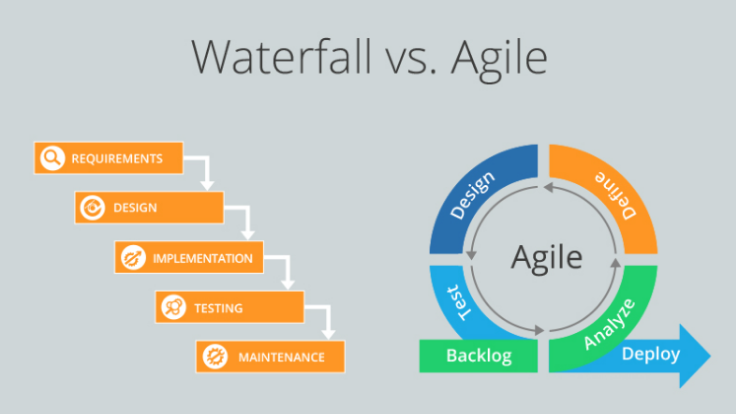
Which one is right for you: Waterfall or Agile?

The first thing to discuss before starting a project for most IT companies is whether to follow the Waterfall or Agile software development method. The two methods come with their own distinct advantages and thus contribute differently to the resulting performance. Here, in order to help you choose better, we aim to differentiate between the two.

System of Waterfalls

The waterfall method is a conventional, linear approach to the creation of code following a recorded sequence of steps:

  1. Documentation of criteria
  2. Design
  3. Testing code and unit
  4. Testing the system
  5. Testing of user acceptance
  6. Correction of bugs
  7. Product completed

The above sequence is followed by a waterfall method project in steps without going back and forth.

Waterfall’s Method Advantages

  • The project’s process flow is determined and agreed from beginning to end, making end-to-end planning more efficient and transparent.
  • Measuring progress across the SDLC is easier.
  • Client presence is hardly needed except for pre-determined reviews and approvals.
  • Design is completed early in the development cycle, making the completion of the project faster in projects requiring the integration of multiple modules.
  • Since ALL the software deliverables are decided early, the software can be planned more carefully – this will ensure that no aspect of the software being developed is wrong with the software as a whole.

Related Post: What is Agile Methodology?

Drawback’s of process Waterfall

  • Up to the last few steps of the process, no working code is made.
  • It is not appropriate for projects where there is a risk of changing requirements. There are a fair amount of improvements that consumers put in with most projects.
  • Therefore, it will be impractical to use the waterfall model approach in such situations.
  • Changing a project’s scope in a waterfall methodology frequently can cause expensive delays and drastically change the required output.
  • Since all modules are integrated only at the last stage, it becomes difficult to identify potential project bottlenecks
  • Often with only the specifications file, it is difficult to visualize the program in its entirety. So in cases where changes to the software are needed, this can only be done after the development process has bee completed. This makes it hard to implement software changes when following the Waterfall method.

Agile Methodology

Agile is an iterative software development process that requires a close feedback loop to quickly develop applications. Agile deviates from a document-based approach to a collaborative software development approach. “Sprints” are created during the development of software using Agile instead of tasks. That sprint usually lasts a few weeks ad within that time a list of deliverables is completed and sent to the customer for review. There is an end-of-spirit test for customers after which the job for the next sprint is decided.

Related Post: What is Business Process Mangement?

The benefits of Agile method

  • Because the user is often involved in the process of software development, the correct decisions are made in the project very early.
  • For what the technology is shaping us to be, the user gets a first-hand view and can, therefore, get a sense of ownership of the venture.
  • If the time-to-time market available is short, Agile can help you quickly release a rudimentary software version.

Agile method Drawbacks

Agile can be problematic for customers who have no time or interest in getting involved with the project frequently. Since agile involves frequent re-prioritization, a few modules set for release within a sprint can become difficult to complete. In such instances, adding all of the functionality to the code requires additional sprints. This can increase the time and cost of implementing the solution.

While Agile and Waterfall are popular methods of software development, we are absorbing your requirements at Ouriken to design our own software development framework or to use Agile and Waterfall methods to deliver our best. To learn more about our methods of development, get in touch with us now.

Ouriken’s Agile consulting framework includes agile consulting, delivery transformation, digital, analytics, and development to meet customer needs. Ouriken is a standalone web design and digital agency. We design and implements powerful solutions for small and medium businesses in technology, business, and operations.

[contact-form][contact-field label=”Name” type=”name” required=”true” /][contact-field label=”Email” type=”email” required=”true” /][contact-field label=”Website” type=”url” /][contact-field label=”Message” type=”textarea” /][/contact-form]

What is Agile Methodology?

Agile Methodology is a process that promotes continues iteration of development and testing throughout the software development life cycle of the project. Unlike the waterfall model, both development and testing activities are concurrent. It’s also a hyped word in the IT industry where they use it to describe the alternative method of project management. A process that provides quick and capricious responses to the feedback they receive on their project. During the development cycle itself, it creates opportunities to assess a project’s direction. Assessment of the project in regular meetings is called sprints or iterations.

It’s very empowering in nature that helps companies to design and build the right product. It is beneficial for software companies because of the management process and it helps them to analyze and improve their product throughout its development which enables companies to make a highly valuable product so they stay competitive in the market.

Origin of Agile

A small group of people in 2011, tired of all the traditional approach for management of software development projects, so after brainstorming for while they came up with the agile manifesto. It is a more practical and improved method for managing the progress of software projects.

Four Important agile manifesto values:

  1. Instead of processes and tools focus should be more on individuals and interactions.
  2. Rather than comprehensive documentation, working software is a priority.
  3. Contract negotiation is a bad practice in agile, customer collaboration is more vital.
  4. Instead of the process working like a robot and following a plan, it must respond to changes.

Business advantages of Agile

Whatever the common risks that are associated with the delivery, scope, and budget of the project, it gets reduced with the help of agile management. It focuses on the encouragement of collaboration between the customer and the team, offering mutual benefits in the migration of high risks during the development of the software.

In 2009, Dr. David F Rico did a comparison between agile and traditional methods of software project management. He analyzed 23 agile processes during his research and synthesis, comparing them with 7500 traditional projects. There he found 20 projects where agile was beneficial, in terms of business value 41% were better, 83% showed quicker time-to-market speeds, Quality-wise 50% were high, 50% were inexpensive, and 83% were more productive. Since then, agile consulting services are offered to boost the performance of their software development life cycle.

Agile Methodology

Agile Methodologies

There are many agile methodologies that share similar philosophies, characteristics, and practices. Subsequently, each agile has its own practices, terminology, and tactics at the point of implementation.

Scrum

A management framework with far-reaching abilities to manage the iterations and increment in all project types. Scrum is lightweight and can be used with other agile methodologies for various engineering practices. Because of their simplicity and having a higher productivity rate scrums have grown in popularity within the agile software development.

Related Post: Why Businesses Must Integrate Artificial Intelligence [IoT]?

Lean and Kanban

Lean Software development

Originally developed by Mary and Tom poppendieck, lean software development is an iteration methodology where many of its principles and practices in lean software development came from the lean enterprise movement, and Toyota was the first company to utilize it. This value-based method focuses on delivering an efficient “value stream” mechanism that gives the value to the project. This methodology works on some of the principles those are, eliminate waste, amplify learning, make decisions as late as possible, deliver results as quickly as possible, empower the team, build integrity, and envision the whole project.

It works as a first choice only the features that have real value to the system, delivering and prioritizing them in small batches leads to the elimination of waste. It emphasizes on speed and efficiency relying on rapid and reliable feedback between the customers and programmers. Ensuring Everyone’s productivity this methodology concentrates on efficiencies of team resources.

The Kanban Method

Kanban Method is used to manage the project’s creation while concentrating on the continued delivery and not over pressurizing the development team. Just like Scrum, Kanban processes help teams work together and efficiently.

Three principles of Kanban Method

  1. Visualize what you do; see all the items within the context of each other.
  2. Limit the amount of work in progress (WIP): balance the flow-based approach so teams are not committed to doing too much work at once.
  3. Enhance the flow: as soon as one task is finished start on the next highest job from the backlog

The promotion of continued collaboration is encouraged and ongoing learning and improvements to provide the best possible workflow for the team.

Extreme Programming (XP)

Originally described by Kent Beck, Extreme Programming is one of the most well-known and controversial agile methodologies. It’s a highly disciplinary method of continuously delivering high-quality software faster. To perform continued planning, the customer is actively involved with the closed knit team. The extreme programming method is based on four simple values, Simplicity, Communication, Feedback, and Courage.

Related Post: What to consider while choosing the best Web-Designing Company?

Crystal

In developing software, crystal methodology is one of the most lightweight and adaptable approaches. Including Clear, Crystal Yellow, Crystal Orange, and other uniquely characterized methods, it’s made up of several processes. The factors which drive processes are the size of the team, the criticality of the system, and the priority of the project. There are several essential values of crystal method, they are, Team Work, Simplicity, Communication, Reflection, Frequent Adjustments, Improve Processes. Like other methodologies, this agile process promotes early and frequent working software delivery. Encouragement of high user involvement, adaptability, and eliminations of distractions and bureaucracy.

Dynamic Systems Development Method (DSDM)

Firstly known as Rapid Application Development (RAD), which originated in 1994, the Dynamic Systems Development Method provides an industry standard framework for project delivery. Although the RAD approach developed in an unstructured fashion it was very popular in the 1990s. Now DSDM has evolved and matured, it provides management, execution, foundation in planning, and scaling of the agile process and iteration projects. It has six key principles revolving around the business needs, Value, Active User Involvement, Empowered Teams, Frequent Delivery, Integrated testing, Stakeholder Collaboration. Approach for delivery and acceptance criteria, DSDM uses “fitness for business purpose”. The main formula for DSDM is 80% system development in 20% time.

Feature Driven Development (FDD)

Feature Driven Development was developed by Jeff De Luca, along with contributors, A.M. Rajashima, Lim Bak Wee, Paul Szego, Jon Kern, and Stephen Palmer. It begins by first establishing the shape of an agile model, it is a short iteration process and it is model driven. Because they are small and useful, these features appeal to clients. By using these eight practices the FDD is designed and delivered, Domain Object Modeling, Development of Features, Component and Class Ownership, Feature Teams, Inspections, Configuration Management, Regular Builds, Visibility of progress and results.

Conclusion

A very exciting and fascinating approach to software development is agile management. The result is a more rewarding experience for everyone involved, by integrating the product developers and customers in the planning and implementing processes. If done properly, organizations can continuously find ways to increase the value to their customers. It produces more generous end results for the company by those who are actively working on the project and create a more positive experience for the customer. As Agile Consulting says “Learn from yesterday, live for today, hope for tomorrow.”

Ouriken is a standalone web design and digital agency. We design and implements powerful solutions for small and medium businesses in technology, business, and operations.